A Star Map Ornament of Your Night, Printed at Home
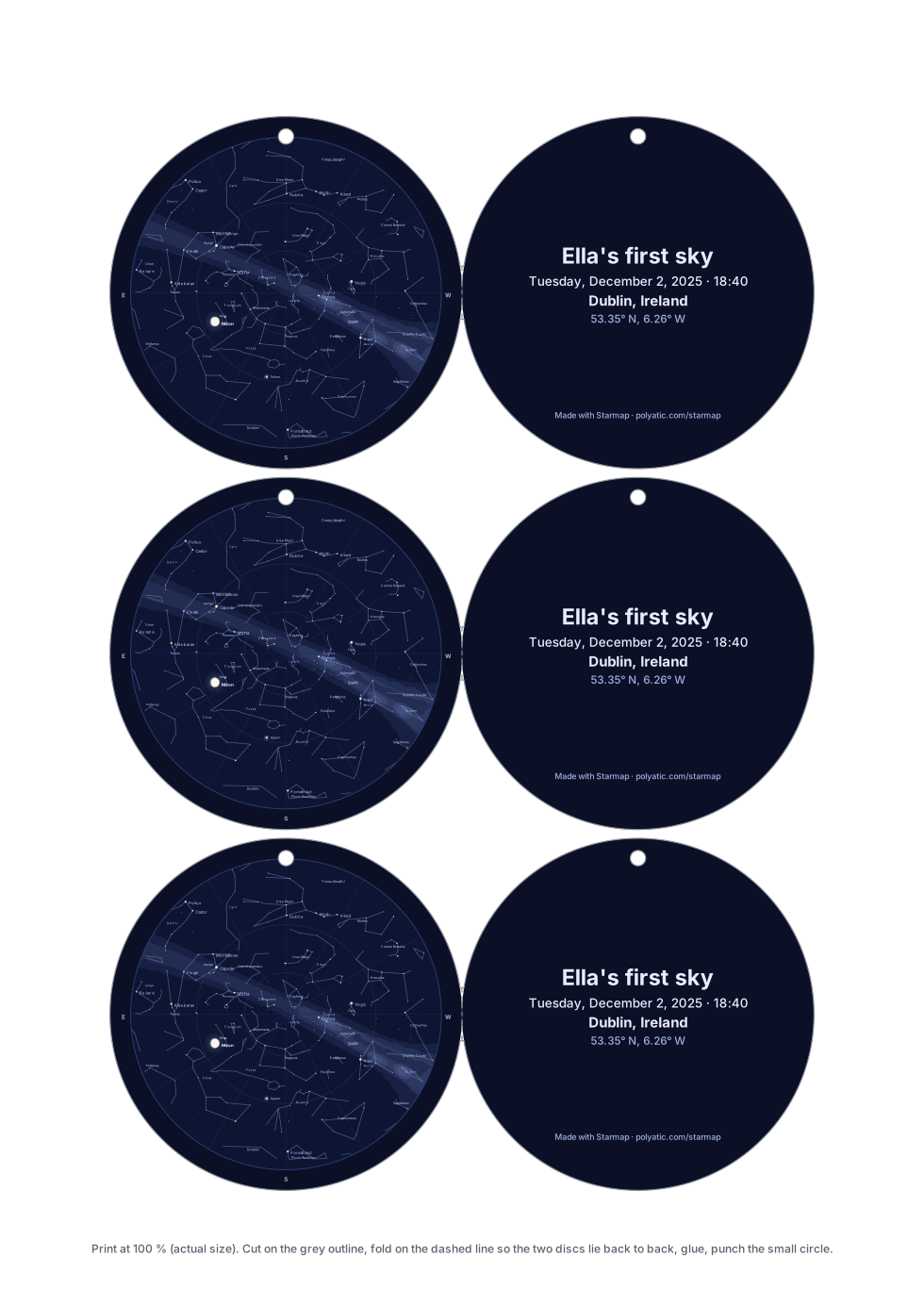
Each ornament is two discs: the front is the sky as it stood over your town at that minute, with the Moon in its real phase and any planet that was up; the back carries your words, the date, the place and its coordinates, plus up to three lines of dedication if you add them. The PDF page is exactly A4 (21 × 29.7 cm) or US Letter (8.5 × 11 in), so a disc chosen at 8 cm comes out of the printer 8 cm across.
Open the ornament sheet
Free, no account, nothing to buy. The PDF is one A4 or US Letter page at real size; there is nothing to order and nothing is sent anywhere.
What one sheet holds
- 7 cm discs (2.8 in): four ornaments on A4, three on Letter.
- 8 cm discs (3.1 in): three on either sheet. This is the size the generator opens on.
- 10 cm discs (3.9 in): two on either sheet. Easier to read the star names on, heavier on a thin branch.
You choose how front and back are joined. Two discs puts each sky beside its back as separate circles, to glue together. Joined at one point draws them touching, with a 12 mm fold neck, so one cut gives a two-sided ornament. Every disc stays at least 4 mm from the paper edge, the strip most home printers cannot reach, and 2 mm of paper separates two cut lines so scissors can follow each.
Making it at a kitchen table
- Paper. Thin card of 160 to 220 g/m² (60 to 80 lb cover) hangs flat and still feeds through most home printers; check the heaviest weight your printer’s manual lists, and use the rear or manual feed if it has one. Card of 300 g/m² jams many desktop printers. Ordinary 80 g/m² paper also works if you glue the printed discs onto a cereal-box card before cutting. The Night theme covers each disc in navy ink; the Ink on paper theme uses a fraction of it.
- Print at 100 %. In the print dialog pick Actual size or 100 %, not Fit to page. Measure one disc with a ruler: it should be the size you chose to the millimetre.
- Cut. With scissors, first cut a rough square round each ornament, then follow the grey line by turning the card, not the scissors, keeping the blades in one place. A rotary circle cutter set to half the diameter (40 mm for an 8 cm disc) gives a cleaner edge, but only on Two discs: on the joined style the blade would cut through the fold neck, so use scissors there.
- Fold and glue. On the joined style, score the short dashed line with a ruler and a dry ballpoint, fold the back disc behind the sky and line up the edges. A thin, even coat of glue stick wrinkles card less than liquid glue. Leave it under a heavy book for ten minutes.
- Hole and thread. The small circle at the top of each disc is 3.5 mm across, centred 4.5 mm in from the edge. A thick needle, an awl or a 3 mm punch keeps paper above it; a standard 6 mm office punch leaves only about 1.5 mm, which tears easily. Push 20 to 25 cm of thread, twine or cord through, knot the ends, and hang it.
How long it takes: about half an hour for a sheet of three 8 cm ornaments: a minute or two to print, ten to fifteen to cut with scissors, a few to glue and punch, and ten under the book.
The sample above
Of the catalogue stars, 770 were above Dublin’s horizon at 18:40 that evening, and the sky disc is the same chart the A4 poster draws, scaled into a circle 7 cm across inside the 8 cm cut. Be honest with yourself about the lettering: on an 8 cm disc the constellation names are under a millimetre tall, readable only up close, and 10 cm makes them a quarter larger, not large. What reads from a step away is the pattern of stars, the Moon and the pale band of the Milky Way; the words on the back are set large enough to read at arm’s length.
What the chart draws
The chart holds the 1,630 stars brighter than magnitude 5.0 and the 89 constellation figures, and the Milky Way is drawn as a soft band. The Moon is drawn in its real phase, and left off when it was below your horizon. The five naked-eye planets, Mercury, Venus, Mars, Jupiter and Saturn, are drawn where they stood. The Sun is drawn too whenever it was up, and the caption says whether your moment was daylight, twilight or full dark: the stars are always drawn where they stood, even when daylight or twilight hid them. So is an eclipse, if your moment falls inside one. Uranus, Neptune and 133 deep-sky objects are one switch away: tick Deep-sky objects and the chart marks the Messier objects and southern showpieces and adds Uranus and Neptune (see them over London on a winter evening). Great comets since 1900 can be added (Hale-Bopp over London, 1997). Not drawn: faint comets and satellites, whose orbits this tool does not compute. Every position is carried to your date by precession. Not modelled: the stars’ own proper motion. A date before 15 October 1582 is read in the Julian calendar. It all runs in your browser, nothing is uploaded, and the downloads are complete and free. Accuracy, print sizes and privacy, answered in full.
Common questions
Is it really the sky of that moment?
Yes. The same engine that draws the full-size poster places every star of magnitude 5.0 and brighter, the Moon in its phase and the five naked-eye planets as they stood above your town at the minute you give, in that town’s own clock time. The middle of the disc is straight overhead and the rim is the horizon, with east on the left because you are looking up. The sky disc is the full chart scaled down, not a decorative pattern.
Why are some star names near the hole left out?
So that the punch never cuts through letters. No star or constellation name prints within 5 mm of the hole marker, and the N compass letter at the top of the rim is left off for the same reason. The stars themselves stay; the punched hole sits on the northern edge of the horizon ring, so the only sky it removes is a sliver right down on the northern horizon.
Why must I print at 100 %?
Because the PDF page is exactly A4 or US Letter and the discs are drawn at real size on it. Fit to page or Shrink to printable area scales the whole sheet down by a few per cent, so an 8 cm disc comes out a few millimetres short. If your printer is set to the other paper size, choose the matching sheet in the generator; it offers A4 and Letter only, because larger posters would not be cut by hand.
Can I make a gift tag instead?
Yes. Choose Gift tag under Front and back: a 7 cm disc joined to its back at one point, with To and From lines on the back to write on, four to an A4 sheet and three on Letter. The front is the same real sky of your date and town; punch the hole and tie it to the present.